Rings Around an ROI
This tutorial measures the tissue around an ROI: for example the fat around a coronary artery, or the tissue around a tumour. The grow_mask step makes the ring, and a resegment step keeps one tissue of the ring.
What You Need
- An image, for example a CT angiography.
- A mask of the structure, for example a vessel segment (lumen and wall) or a lesion.
1. Make the Ring in a Configuration
from pictologics import RadiomicsPipeline

pipeline = RadiomicsPipeline(load_standard=False)
pipeline.add_config("fat_ring", [
    {"step": "resample", "params": {"new_spacing": (0.5, 0.5, 0.5)}},
    {"step": "grow_mask", "params": {"from_mm": 0, "to_mm": 3}},             # the 3 mm around the mask
    {"step": "resegment", "params": {"range_min": -190, "range_max": -30}},  # fat only
    {"step": "extract_features", "params": {"families": ["intensity"]}},
])

results = pipeline.run("ccta.nii.gz", "vessel_segment.nii.gz", config_names=["fat_ring"])
fat = results["fat_ring"]
print(fat["mean_intensity_Q4LE"])  # the mean attenuation of the fat in the ring (HU)
The steps work in this order:
resamplemakes cubic voxels of 0.5 mm.grow_maskkeeps the voxels from 0 to 3 mm outside the mask. The mask itself is not part of the ring.resegmentkeeps the ring voxels from -190 to -30 HU, the usual range of fat.extract_featurescomputes the intensity features of these voxels.
2. Choose the Ring
to_mm grows the mask, and a negative to_mm shrinks it. from_mm cuts out the inner part, which leaves a ring.
| Goal | from_mm |
to_mm |
|---|---|---|
| The mask grown by 3 mm | 3 |
|
| The mask without its outer 1 mm (its core) | -1 |
|
| A ring of 3 mm around the mask | 0 |
3 |
| A ring from 2 to 5 mm (a gap of 2 mm) | 2 |
5 |
| The outer 1 mm of the mask (its rim) | -1 |
0 |
The figure shows each row on a vessel (blue outline) in fat, with myocardium below it: the orange voxels are the mask of the step. The last frame adds the resegment step of fat, which leaves out the ring voxels in the myocardium. Move the slider, or press Play.
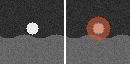
The distances are in mm, with the spacing of each axis. So the ring has the same width in every direction, and the width does not depend on the direction of a vessel.
Keep the morphology of the structure
With "apply_to": "intensity", the step changes only the intensity mask. The morphology features then describe the structure, and the intensity and texture features describe the ring.
3. Check the Ring
Make the ring with the function grow_mask, save it, and look at it on the image, for example in 3D Slicer:
from pictologics import load_image, save_image
from pictologics.preprocessing import grow_mask

image = load_image("ccta.nii.gz")
mask = load_image("vessel_segment.nii.gz", reference_image=image)
ring = grow_mask(mask, to_mm=3, from_mm=0)
save_image(ring, "ring.nii.gz")
4. Rings of Touching ROIs
When ROIs touch, for example the segments of a vessel or the AHA segments of the myocardium, the ring of one ROI covers the space near the other ROIs. With nearest_roi, run_rois gives each ring voxel to its nearest ROI. So no voxel counts twice, and no ring covers another ROI.
pipeline.add_config("segment_rings", [
    {"step": "resample", "params": {"new_spacing": (0.5, 0.5, 0.5)}},
    {"step": "grow_mask", "params": {"from_mm": 0, "to_mm": 3, "nearest_roi": True}},
    {"step": "resegment", "params": {"range_min": -190, "range_max": -30}},
    {"step": "extract_features", "params": {"families": ["intensity"]}},
])

# One label for each segment: 1 proximal, 2 mid, 3 distal
by_segment = pipeline.run_rois(
    "ccta.nii.gz",
    "vessel_segments.nii.gz",
    labels={"proximal": 1, "mid": 2, "distal": 3},
    config_names=["segment_rings"],
)
for name, results in by_segment.items():
    print(name, results["segment_rings"]["mean_intensity_Q4LE"])
The figure shows three segments of a vessel (proximal blue, mid orange, distal green). Without nearest_roi, the ring of the mid segment covers the ends of the other segments. With nearest_roi, each ring voxel goes to its nearest segment.
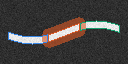
Where two vessel segments meet, the border between their rings is square to the vessel. At the free ends of the vessel, the ring goes around the end.
Notes
- The distance of a voxel is the distance between voxel centers. Outside the mask, it is the distance to the nearest mask voxel; inside the mask, the distance to the nearest voxel outside it.
- The mask changes by whole voxels: a grow by 1 mm on 0.4 mm voxels adds 2 voxels along an axis.
- The voxels past the image edge count as outside the mask, so a shrink also removes the mask voxels at the image edge.
- A ring voxel without image data (a padding value, see
source_mode) leaves the ring. - Put
grow_maskafterresampleand beforeresegmentanddiscretise. - In
run()there is only one ROI, sonearest_roichanges nothing there.
See also: grow_mask in the step reference and Many ROIs and Batch Studies.