Masks from Other Tools
Segmentation programs write masks in many forms: NIfTI label maps, probability maps, DICOM SEG, DICOM RTSTRUCT and 3D Slicer .seg.nrrd files. This tutorial loads each form onto the grid of the image and runs the pipeline on it.
The Rule
Load a mask with the image as reference_image. The loader then places the mask on the grid of the image, or raises an error that tells why it cannot:
from pictologics import load_image

ct = load_image("ct_folder/")
mask = load_image("segmentation.nii.gz", reference_image=ct)
run(), run_rois() and run_batch() do this for a mask path by themselves. So in a pipeline, give the paths.
1. NIfTI Label Maps
Programs such as nnU-Net, TotalSegmentator and ITK-SNAP write a NIfTI label map: 0 for the background, and a label number for each structure.
from pictologics import RadiomicsPipeline

pipeline = RadiomicsPipeline()
results = pipeline.run_rois(
    "ct.nii.gz",
    "organs.nii.gz",
    labels={"liver": 5, "spleen": 1},  # the label numbers of the program
    config_names=["standard_fbs_16"],
)
The figure shows a label map with three labels (1 spleen, 2 kidney, 5 liver) and the ROI (orange) that each choice gives.

- One ROI from all labels:
run("ct.nii.gz", "organs.nii.gz", ...)takes each voxel that is not 0 as ROI. - One label: add a
binarize_maskstep withmask_values, or userun_roiswith one label. - Voxel order: a NIfTI mask can hold the grid of a DICOM image with its axes flipped or swapped, as some converters write it. The loader turns it to the voxel order of the image.
2. Probability Maps
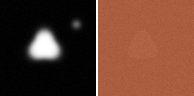
A deep learning model often writes a probability for each voxel (a float from 0 to 1). Each voxel above 0 is ROI, so the pipeline warns about such a mask. Add a threshold:
pipeline = RadiomicsPipeline(load_standard=False)
pipeline.add_config("lesion", [
    {"step": "binarize_mask", "params": {"threshold": 0.5}},  # a probability of 0.5 or more
    {"step": "resample", "params": {"new_spacing": (1.0, 1.0, 1.0)}},
    {"step": "extract_features", "params": {"families": ["intensity", "morphology"]}},
])
results = pipeline.run("ct.nii.gz", "lesion_probability.nii.gz", config_names=["lesion"])
The figure shows a probability map (left; black is 0, white is 1) and the ROI (orange) on the CT slice (right). The map has a small value in every voxel and a weak second blob, as models often give.
Put the binarize_mask step before the resample step: the resample then works on a mask of 0 and 1.
3. DICOM SEG
from pictologics import load_seg
from pictologics.loaders import get_segment_info

for segment in get_segment_info("seg.dcm"):
    print(segment["segment_number"], segment["segment_label"])

labels = {s["segment_label"]: s["segment_number"] for s in get_segment_info("seg.dcm")}
results = pipeline.run_rois("ct_folder/", "seg.dcm", labels=labels, config_names=["lesion"])
masks = load_seg("seg.dcm", reference_image=ct, combine_segments=False)  # {number: mask}, for overlaps
- A SEG often holds frames only on the slices of its segments. With the image as the reference, the mask has the full grid of the image.
- Segments that overlap need
combine_segments=False, and onerun()for each mask.
4. DICOM RTSTRUCT
An RTSTRUCT holds contours (polygons), so the loader fills them on the grid of the image:
from pictologics import load_rtstruct

for roi in get_segment_info("rtstruct.dcm"):
    print(roi["segment_number"], roi["segment_label"], roi["contour_count"])

masks = load_rtstruct("rtstruct.dcm", ct, roi_names=["GTV", "PTV"], combine_rois=False)
results = pipeline.run(ct, masks["GTV"], config_names=["lesion"])
- A GTV lies inside a PTV, so the two ROIs overlap: load them with
combine_rois=False, and run each mask. run(image, "rtstruct.dcm")takes all ROIs together as one ROI.run_rois(image, "rtstruct.dcm")runs each ROI by its ROI Number, for ROIs that do not overlap, for example organs. In one label image, a later ROI covers an earlier one where they overlap, so an ROI inside a later ROI has no voxels left.
5. 3D Slicer Segmentations
A .seg.nrrd file holds each segment as a label value in a layer:
for segment in get_segment_info("Segmentation.seg.nrrd"):
    print(segment["segment_label"], segment["label_value"], segment["layer"])

labels = {s["segment_label"]: s["label_value"] for s in get_segment_info("Segmentation.seg.nrrd") if s["layer"] == 0}
results = pipeline.run_rois("ct.nrrd", "Segmentation.seg.nrrd", labels=labels, config_names=["lesion"])
A file with overlapping segments has more than one layer. Load a layer with load_image("Segmentation.seg.nrrd", reference_image=ct, dataset_index=1).
6. Check the Mask
Look at the mask on the image before a study:
from pictologics import save_image
from pictologics.utilities import save_slices

mask = load_image("seg.dcm", reference_image=ct)
save_slices("qc/p001", image=ct, mask=mask, slice_selection="10%", window_center=40, window_width=400)
save_image(mask, "qc/p001_mask.nii.gz")  # for 3D Slicer or ITK-SNAP
When a Mask Does Not Load
| Problem | Cause | What to do |
|---|---|---|
| Another spacing | The mask has another voxel size | Make the mask on the image, or resample it in its program. Pictologics does not resample masks |
| Another orientation | The mask axes are not the image axes | The same |
An offset above subvoxel_tolerance |
The mask grid is off the image grid by a part of a voxel | Check that the mask belongs to this image |
An overlap below min_overlap_fraction |
Most of the mask lies outside the image | The mask can belong to another image |
A warning about the FrameOfReferenceUID |
A DICOM mask of another frame of reference | The mask can belong to another scan |
See Data Loading for all settings.