Benchmarks
Speed of Pictologics
This page gives the speed of Pictologics 1.0.0 on one computer. A later version of this page will compare more programs, data sets and computers.
How we measured
- Data: synthetic and seeded. Correlated noise with blob-shaped ROIs (with holes) for the features; normal noise cubes of 1 mm voxels for the filters; a CT-like image of 512 × 512 × 200 voxels (0.7 × 0.7 × 1.25 mm: air, a body of soft tissue with noise, a lesion of 20 mm radius of 54,746 voxels) for the preprocessing, the pipeline and the loaders.
- Time: the wall-clock time of one call, the median of 5 runs after one warm-up run (the warm-up compiles the numba code). The tables give the median; the list tables also give the fastest and the slowest run.
- Threads: numba uses 10 threads (the default of Pictologics on this computer), except in the thread test.
- Features: the feature functions on their own, without the pipeline. The texture rows use FBN 32, except in the grey level table.
Computer and Software
- Hardware: Apple M4 Pro, 14 cores, 48 GB
- OS: macOS 27.0.1 (arm64)
- Python: 3.12.10
- Core deps: pictologics 1.0.0, numpy 2.5.4, scipy 1.18.1, numba 0.68.1, pandas 3.1.0, matplotlib 3.11.2
- BLAS/LAPACK: Apple Accelerate (from
numpy.show_config()) - Numba threads: 10
Feature Families
ROI cubes: 25³ (9,861 ROI voxels), 50³ (101,638 ROI voxels), 75³ (315,151 ROI voxels), 100³ (830,970 ROI voxels), 150³ (2,311,384 ROI voxels).
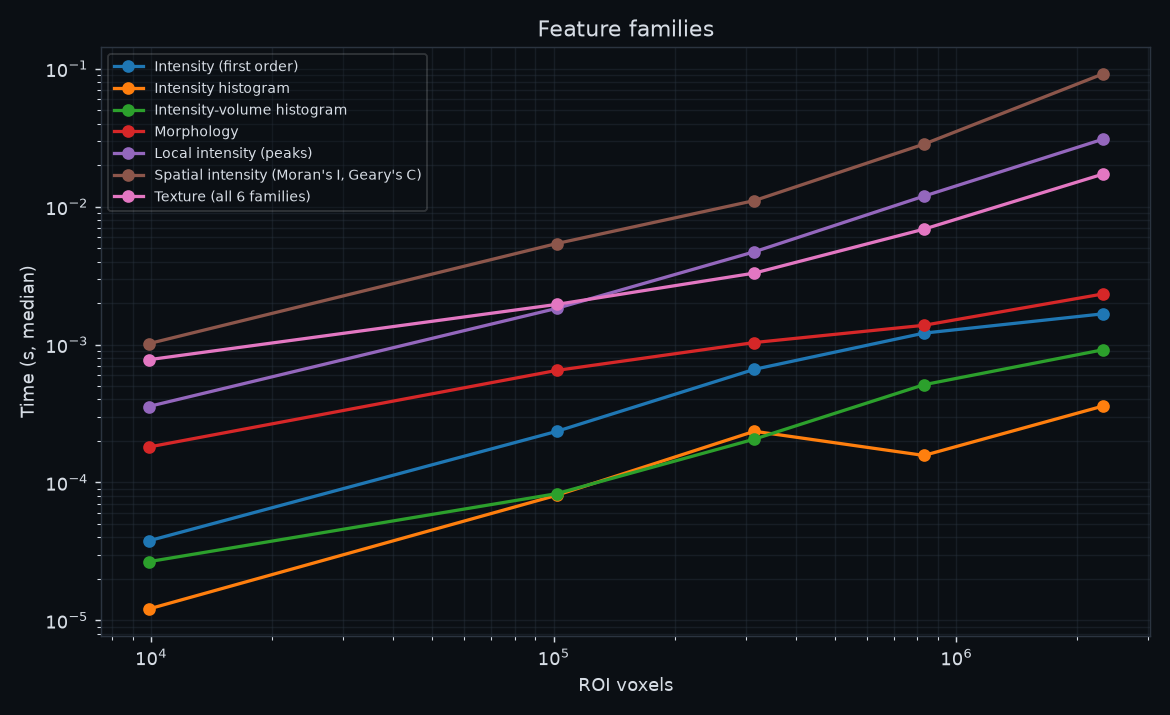
| Task | 25³ | 50³ | 75³ | 100³ | 150³ |
|---|---|---|---|---|---|
| Intensity (first order) | 0.0 ms | 0.2 ms | 0.7 ms | 1.2 ms | 1.7 ms |
| Intensity histogram | 0.0 ms | 0.1 ms | 0.2 ms | 0.2 ms | 0.4 ms |
| Intensity-volume histogram | 0.0 ms | 0.1 ms | 0.2 ms | 0.5 ms | 0.9 ms |
| Morphology | 0.2 ms | 0.6 ms | 1.0 ms | 1.4 ms | 2.3 ms |
| Local intensity (peaks) | 0.4 ms | 1.8 ms | 4.7 ms | 11.9 ms | 30.8 ms |
| Spatial intensity (Moran's I, Geary's C) | 1.0 ms | 5.4 ms | 11.1 ms | 28.4 ms | 91.7 ms |
| Texture (all 6 families) | 0.8 ms | 2.0 ms | 3.3 ms | 6.9 ms | 17.2 ms |
Texture Families
Each family on its own (calculate_all_texture_features(..., families=[...])), FBN 32.
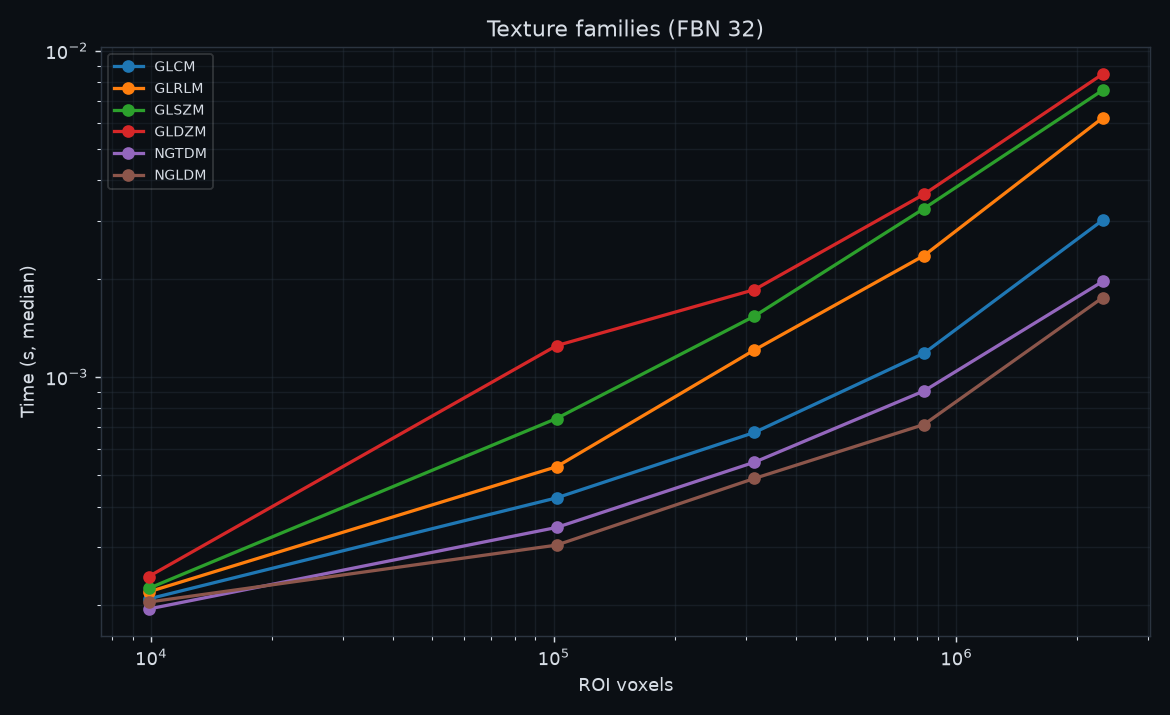
| Task | 25³ | 50³ | 75³ | 100³ | 150³ |
|---|---|---|---|---|---|
| GLCM | 0.2 ms | 0.4 ms | 0.7 ms | 1.2 ms | 3.0 ms |
| GLRLM | 0.2 ms | 0.5 ms | 1.2 ms | 2.4 ms | 6.2 ms |
| GLSZM | 0.2 ms | 0.7 ms | 1.5 ms | 3.3 ms | 7.6 ms |
| GLDZM | 0.2 ms | 1.2 ms | 1.9 ms | 3.6 ms | 8.5 ms |
| NGTDM | 0.2 ms | 0.3 ms | 0.5 ms | 0.9 ms | 2.0 ms |
| NGLDM | 0.2 ms | 0.3 ms | 0.5 ms | 0.7 ms | 1.8 ms |
Texture and Grey Levels
All six texture families on the 75³ cube (315,151 ROI voxels) with FBN discretisation.
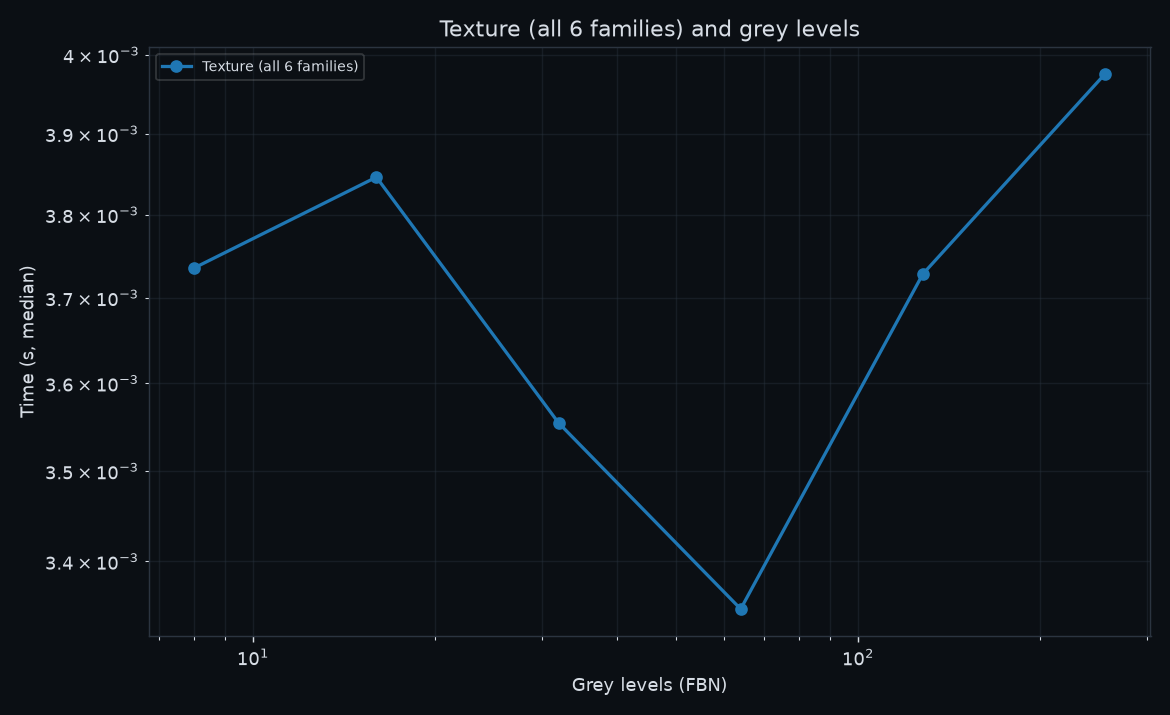
| Task | 8 levels | 16 levels | 32 levels | 64 levels | 128 levels | 256 levels |
|---|---|---|---|---|---|---|
| Texture (all 6 families) | 3.7 ms | 3.8 ms | 3.6 ms | 3.3 ms | 3.7 ms | 4.0 ms |
Filters
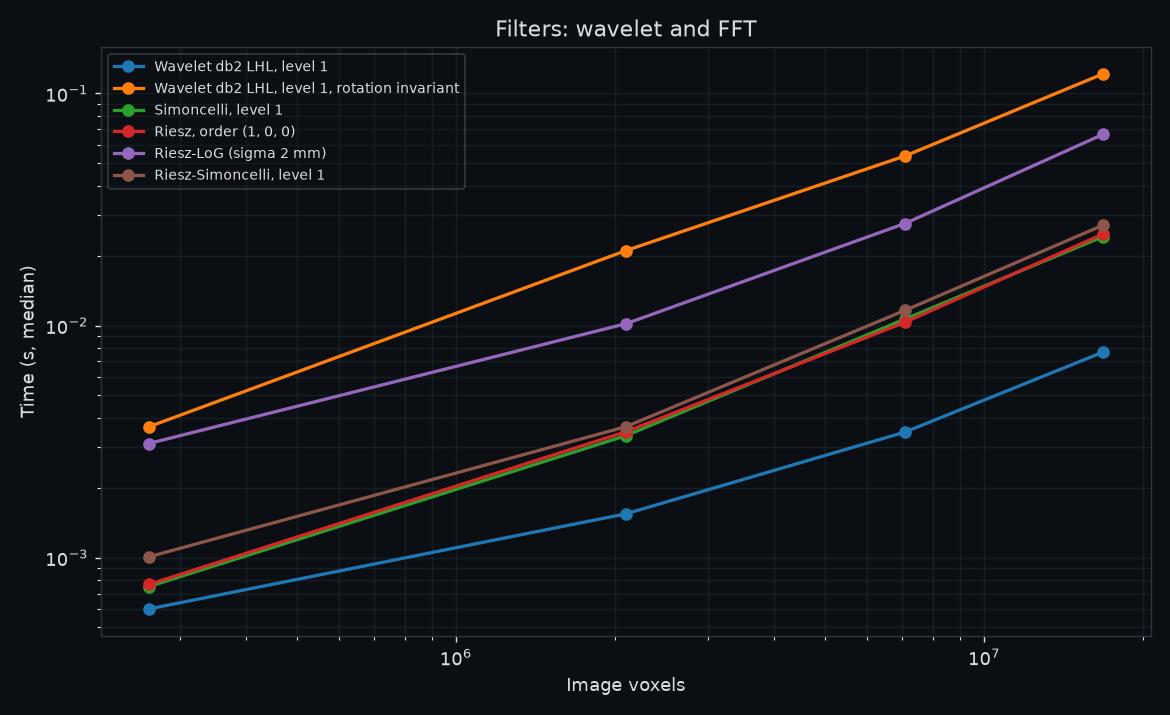
Image cubes of 1 mm voxels. Convolution filters use the mirror boundary; the FFT filters (Simoncelli, Riesz) use their periodic default.
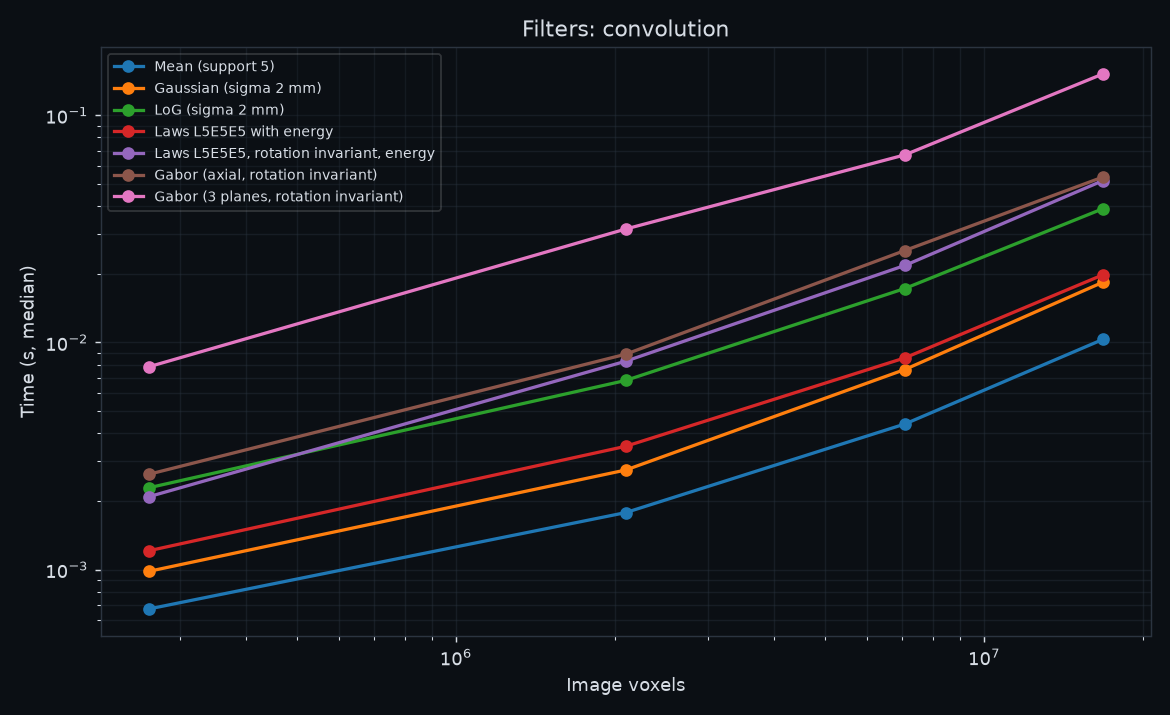
| Task | 64³ | 128³ | 192³ | 256³ |
|---|---|---|---|---|
| Mean (support 5) | 0.7 ms | 1.8 ms | 4.4 ms | 10.3 ms |
| Gaussian (sigma 2 mm) | 1.0 ms | 2.7 ms | 7.6 ms | 18.4 ms |
| LoG (sigma 2 mm) | 2.3 ms | 6.8 ms | 17.3 ms | 38.8 ms |
| Laws L5E5E5 with energy | 1.2 ms | 3.5 ms | 8.6 ms | 19.8 ms |
| Laws L5E5E5, rotation invariant, energy | 2.1 ms | 8.3 ms | 21.8 ms | 51.6 ms |
| Gabor (axial, rotation invariant) | 2.6 ms | 8.9 ms | 25.4 ms | 53.5 ms |
| Gabor (3 planes, rotation invariant) | 7.8 ms | 31.6 ms | 67.0 ms | 152.2 ms |
| Wavelet db2 LHL, level 1 | 0.6 ms | 1.5 ms | 3.5 ms | 7.7 ms |
| Wavelet db2 LHL, level 1, rotation invariant | 3.7 ms | 21.0 ms | 53.7 ms | 121.3 ms |
| Simoncelli, level 1 | 0.7 ms | 3.4 ms | 10.7 ms | 24.1 ms |
| Riesz, order (1, 0, 0) | 0.8 ms | 3.5 ms | 10.3 ms | 24.8 ms |
| Riesz-LoG (sigma 2 mm) | 3.1 ms | 10.2 ms | 27.5 ms | 66.6 ms |
| Riesz-Simoncelli, level 1 | 1.0 ms | 3.7 ms | 11.6 ms | 27.0 ms |
Preprocessing
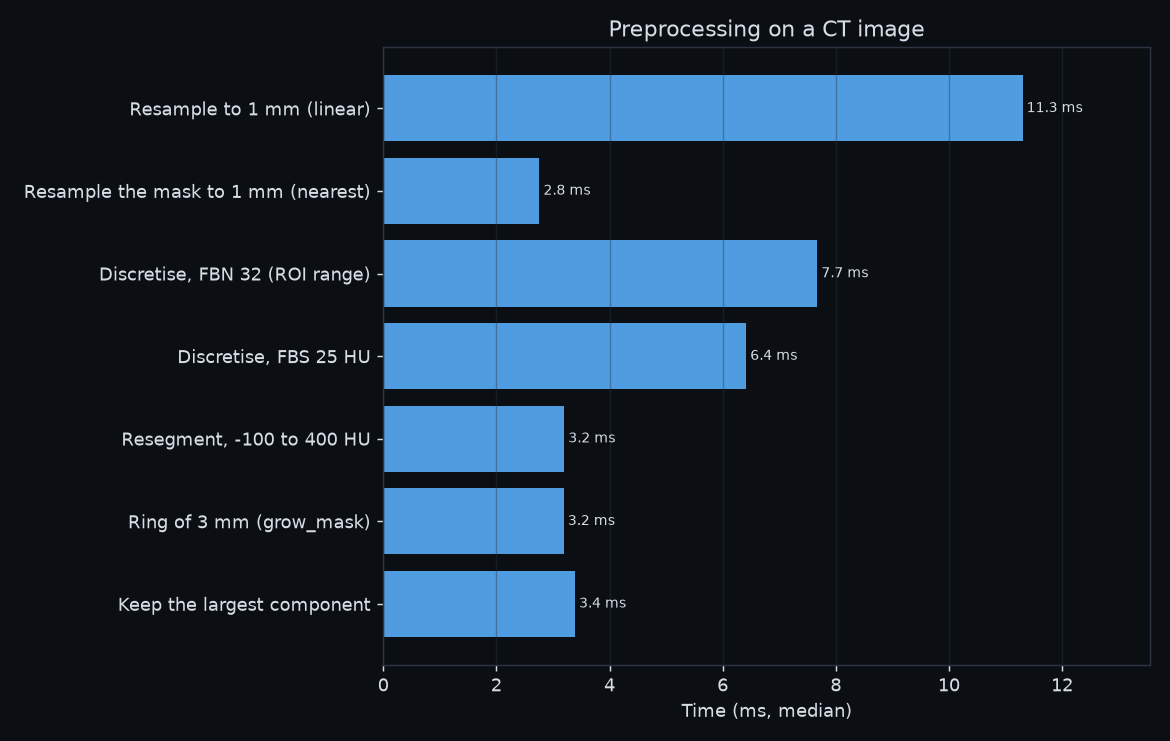
The functions of pictologics.preprocessing on the CT-like image.
| Task | Time (median) | Fastest | Slowest |
|---|---|---|---|
| Resample to 1 mm (linear) | 11.3 ms | 11.2 ms | 12.2 ms |
| Resample the mask to 1 mm (nearest) | 2.8 ms | 2.7 ms | 2.8 ms |
| Discretise, FBN 32 (ROI range) | 7.7 ms | 7.6 ms | 7.8 ms |
| Discretise, FBS 25 HU | 6.4 ms | 6.2 ms | 7.0 ms |
| Resegment, -100 to 400 HU | 3.2 ms | 3.2 ms | 3.3 ms |
| Ring of 3 mm (grow_mask) | 3.2 ms | 3.2 ms | 3.6 ms |
| Keep the largest component | 3.4 ms | 3.3 ms | 3.5 ms |
Pipeline
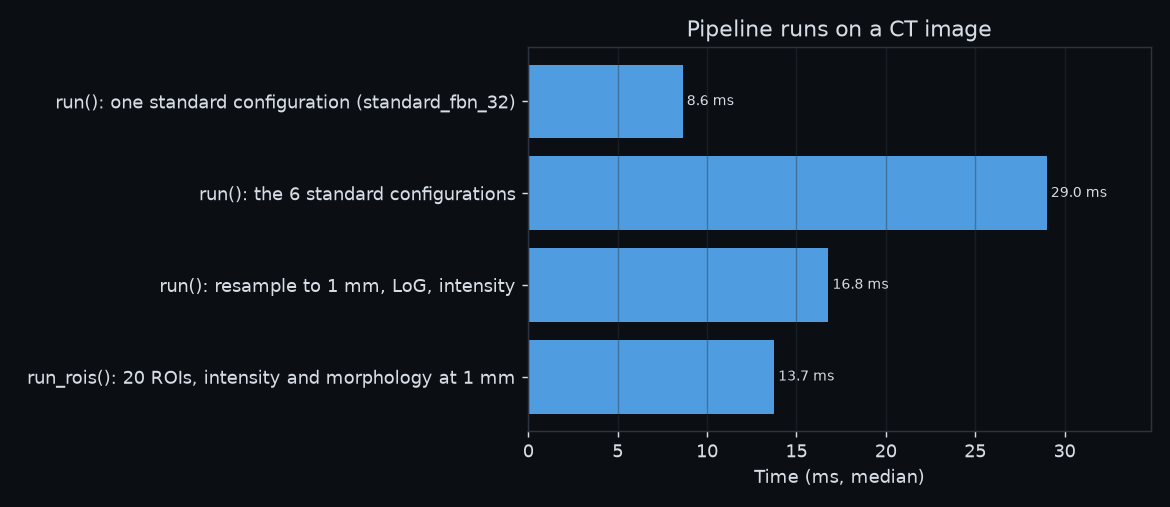
Whole pipeline runs on the CT-like image, from the image in memory to the feature Series. The standard configurations resample to 0.5 mm and compute the intensity, morphology, texture, histogram and IVH features; the pipeline resamples only the region around the ROI. The 20 ROIs of run_rois are spheres of 8 mm radius.
| Task | Time (median) | Fastest | Slowest |
|---|---|---|---|
| run(): one standard configuration (standard_fbn_32) | 8.6 ms | 8.4 ms | 9.1 ms |
| run(): the 6 standard configurations | 29.0 ms | 28.9 ms | 29.3 ms |
| run(): resample to 1 mm, LoG, intensity | 16.8 ms | 16.4 ms | 18.0 ms |
| run_rois(): 20 ROIs, intensity and morphology at 1 mm | 13.7 ms | 13.5 ms | 14.6 ms |
Threads
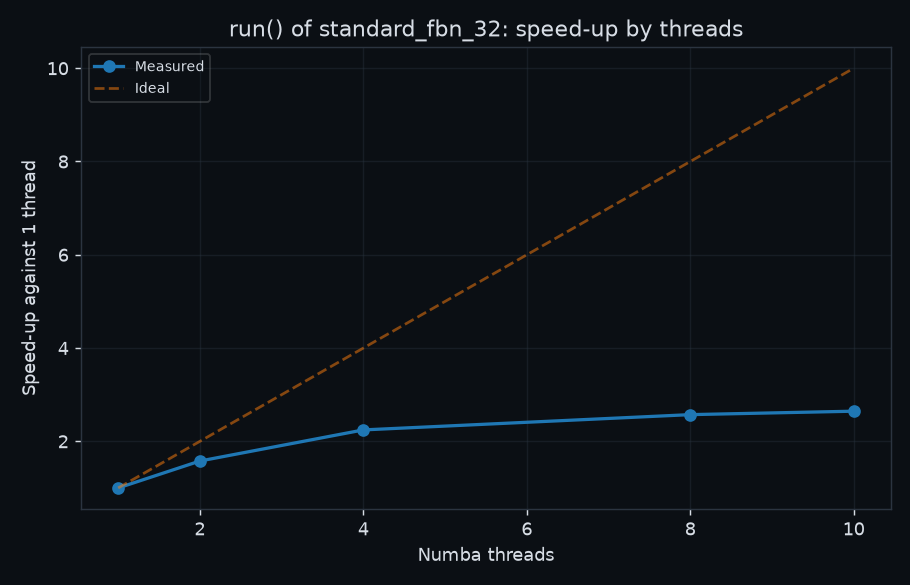
run() of standard_fbn_32 on the CT-like image with 1 to 10 numba threads.
| Task | Time (median) | Fastest | Slowest |
|---|---|---|---|
| 1 thread | 20.9 ms | 20.3 ms | 21.0 ms |
| 2 threads | 13.2 ms | 13.1 ms | 13.5 ms |
| 4 threads | 9.3 ms | 9.1 ms | 9.5 ms |
| 8 threads | 8.1 ms | 7.9 ms | 8.5 ms |
| 10 threads | 7.9 ms | 7.6 ms | 8.4 ms |
Loading
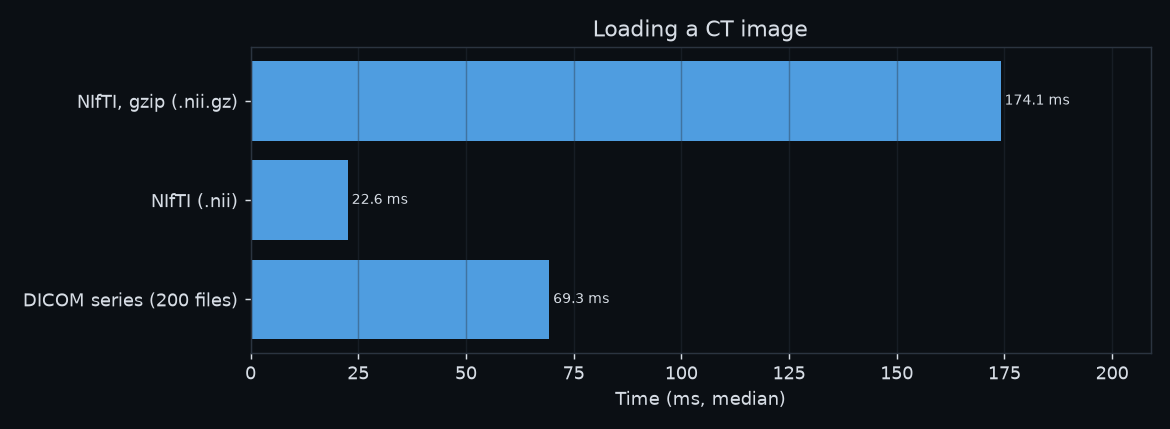
load_image of the CT-like image (int16 values), from a temporary folder on the internal disk.
| Task | Time (median) | Fastest | Slowest |
|---|---|---|---|
| NIfTI, gzip (.nii.gz) | 174.1 ms | 173.5 ms | 181.1 ms |
| NIfTI (.nii) | 22.6 ms | 21.4 ms | 39.6 ms |
| DICOM series (200 files) | 69.3 ms | 67.8 ms | 69.7 ms |